By Marc Gilman
Questions? Call (800) 927-9326 or email
Key Takeaways
-
This guide is for one specific situation: you already have Medicare Part A, and you now need to enroll in Part B only — typically because you’re leaving employer coverage.
-
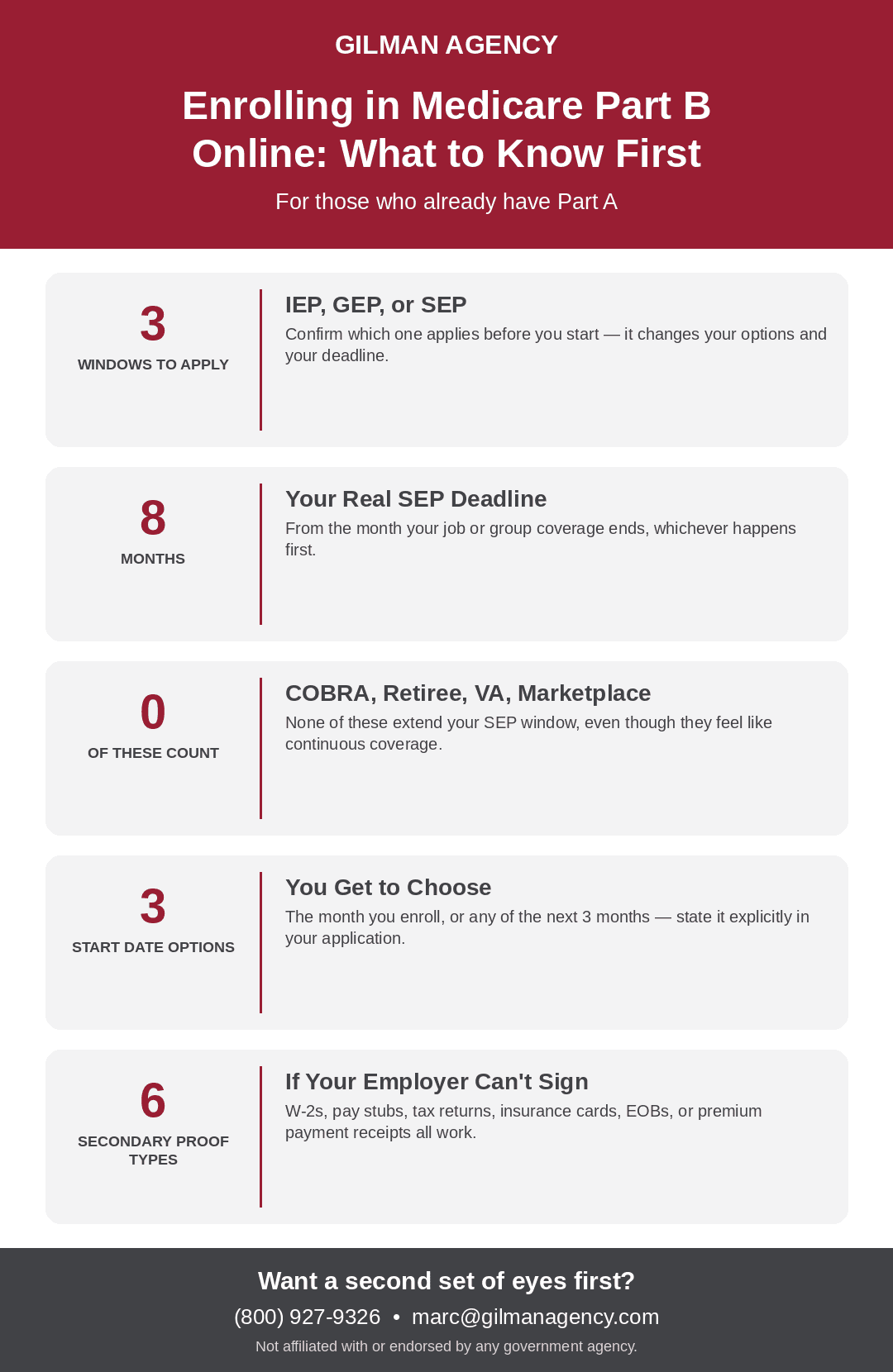
You can only apply now if you’re in one of three windows: your Initial Enrollment Period, the General Enrollment Period (January 1–March 31), or a Special Enrollment Period — which lasts up to 8 months from when your job or group coverage ends, whichever comes first.
-
Applying online replaces the paper CMS-40B and CMS-L564 forms with a digital version of the same information — you’re not filling out less, just filling it out on screen instead of on paper.
-
If your employer can’t complete the coverage-verification section for you, secondary evidence works instead — W-2s, pay stubs, tax returns, or an insurance card showing your coverage dates.
-
Have your documents ready before you start — the application doesn’t save well if you have to stop and hunt for paperwork partway through.
Step 1: Confirm You’re Actually Eligible to Apply Right Now
Before starting the application, confirm which window you’re applying under, since it affects both your eligibility and your coverage start date options:
-
Initial Enrollment Period (IEP) — the 7-month window around your 65th birthday (3 months before, your birthday month, and 3 months after)
-
General Enrollment Period (GEP) — January 1 through March 31 each year, available if you missed your IEP and don’t qualify for a SEP
-
Special Enrollment Period (SEP) — available if you have (or had) coverage through your or your spouse’s current employment. This window lasts up to 8 months from the month your employment or group coverage ends, whichever happens first.
One important catch on the SEP: COBRA, retiree health coverage, VA coverage, and Marketplace coverage do not count as coverage based on current employment. If you’re relying on any of those, you’re not in a SEP window — you may need the General Enrollment Period instead, which can mean a real gap in coverage.
Step 2: Gather Everything Before You Start
Have these ready before opening the application, so you’re not stopping partway through:
-
Your Medicare Number (from your Medicare card)
-
Your Social Security Number
-
Your employer’s name and address
-
The dates your employment and group health coverage started (and ended, if applicable)
-
Evidence of that coverage — see Step 7 for what qualifies
Step 3: Go to the Online Application
Go to ssa.gov/benefits/medicare/ and select the option to apply online. If you’re applying during a Special Enrollment Period, look specifically for “Apply Online for Medicare Part B During a Special Enrollment Period” — this version of the application includes the employment-coverage questions you’ll need to answer.
Step 4: Complete Your Basic Information
This section mirrors Section 1 of the paper CMS-40B form: your Medicare Number, full name, mailing address, phone number, and email address. Standard identifying information — nothing unusual here.
Step 5: Answer the Employment Coverage Questions
You’ll be asked directly:
-
Whether you have (or had) coverage through an employer or union group health plan since you turned 65
-
Whether you were an international volunteer for a non-profit that provided health coverage
If you answer yes to either, you’ll need to provide the dates of employment and coverage — when it started, and when it ended (or confirm it’s still ongoing).
Step 6: State Your Requested Coverage Start Date
This step is easy to overlook, but it matters — you have real choices here, not just a default:
-
The first day of the month you enroll, or
-
The first day of any of the 3 months after you enroll (you specify the month and year)
If you’re applying during any of the remaining 7 months of your 8-month SEP window (rather than right at the start), your coverage will instead begin the first day of the following month automatically. When completing the application, explicitly state “I want Part B coverage to begin (MM/YYYY)” in the remarks section — don’t leave this to assumption.
Step 7: Upload Your Evidence of Coverage
This replaces having your employer physically sign a paper CMS-L564. You have two paths:
-
Upload a completed CMS-L564 (Request for Employment Information) if your employer is willing to fill out Section B, or written notification from your employer, group health plan, or large group health plan confirming your coverage dates.
-
If your employer can’t or won’t complete it, fill out what you can yourself and submit secondary evidence instead: income tax returns showing health insurance premiums paid, W-2s reflecting pre-tax medical contributions, pay stubs showing premium deductions, a health insurance card with a policy effective date, an explanation of benefits from the plan, or statements/receipts showing premium payments.
Step 8: Review and Submit
Double-check your requested coverage start date and the accuracy of your employment dates before submitting — these are the two details most likely to cause a processing delay if they’re inconsistent with your uploaded evidence.
Step 9: Confirm and Monitor Your Application Status
After submitting, check your status directly on ssa.gov rather than assuming it’s processing correctly — don’t wait until your expected coverage start date to find out something needs correcting. Once your application is fully processed, you’ll receive a Medicare & You handbook in the mail, which is a good sign your enrollment went through.
What To Do Next
Enrolling in Part B online is genuinely straightforward once you know which window you’re applying under and have your employment coverage documentation ready — the process itself is mostly a matter of having the right information in hand before you start. The details most worth getting right are your coverage start date and your evidence of prior coverage, since those are what a processing delay usually comes back to.
If you want a second set of eyes on your application before you submit it, or you’re not sure which enrollment window applies to you, reach out and we’ll walk through it together.
Questions? Call (800) 927-9326 or email