
By Marc Gilman
Questions? Call (800) 927-9326 or email
Key Takeaways
-
Yes, this is true. The Social Security Administration now requires a verified Login.gov (or ID.me) account to access my Social Security, which is the account you need to apply for Medicare Part A or Part B online.
-
This isn’t a Medicare-specific rule — it’s part of a broader SSA move to Login.gov as the mandatory identity verification method for its online services, driven partly by a rise in Social Security-related phishing scams.
-
Creating a Login.gov account takes about 10–15 minutes and requires an email address, a password, and one authentication method (text message, authentication app, or security key).
-
You can create your Login.gov account before you’re ready to apply for Medicare — in fact, setting it up a few months ahead of your enrollment window avoids doing it under time pressure.
-
If you get stuck on identity verification, you don’t have to do it alone — a local Social Security office or a licensed agent can help you work through it.
Is This Actually True?
Yes. If you want to apply for Medicare online — whether that’s during your Initial Enrollment Period, the General Enrollment Period, or a Special Enrollment Period — you’ll go through ssa.gov, and SSA now requires a verified Login.gov account to sign in. This applies whether you’re applying for Medicare only, or Medicare together with Social Security retirement benefits.
This is a relatively recent shift. SSA previously allowed its own separate username/password system for “my Social Security,” but has been transitioning entirely to Login.gov (with ID.me as an alternative) as the single, more secure way to verify your identity across SSA’s online services.
Why Is SSA Requiring This Now?
The short answer: security. SSA’s own Office of the Inspector General has flagged a real increase in scams impersonating the agency — fraudulent emails using official-looking logos, formatting, and even the names of real SSA employees. Login.gov adds a layer of identity verification (including multi-factor authentication) that a simple username and password didn’t provide, which is part of why the switch has been mandatory rather than optional.
The practical effect for you: you can’t skip this step if you want to apply online. The upside is that once it’s set up, it’s set up — you’re not redoing this every time you log in.
How to Create Your Login.gov Account
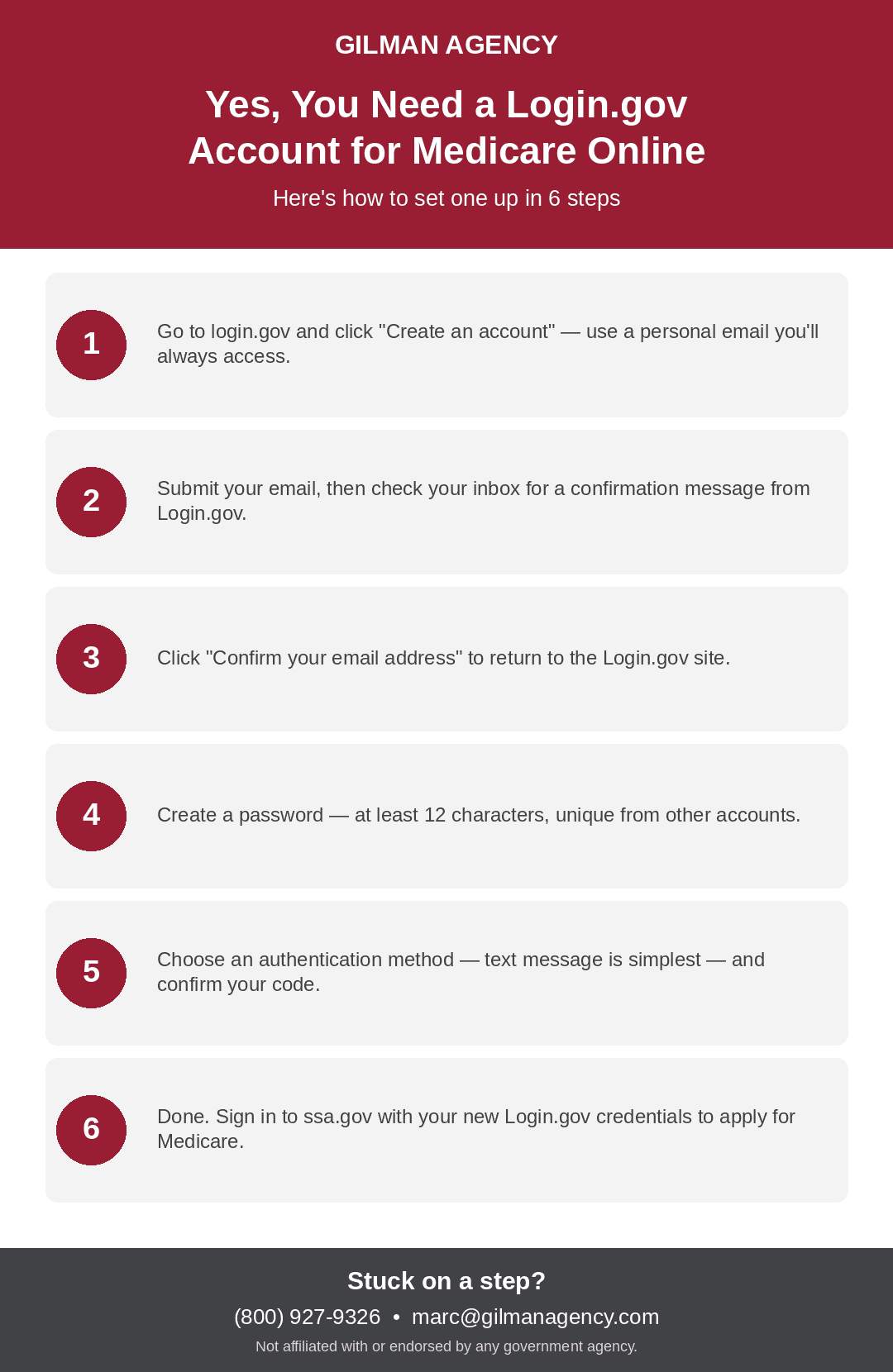
Here’s the actual process, start to finish:
-
Go to login.gov and select “Create an account.” Use a personal email address you’ll always be able to access — not a work email that might change.
-
Enter your email and submit. You’ll be asked to review Login.gov‘s Rules of Use and check a box confirming you’ve read them.
-
Check your email for a confirmation message from Login.gov, and click “Confirm your email address.” This takes you back to the Login.gov site.
-
Create your password. It needs to be at least 12 characters, and shouldn’t be a password you reuse from your bank or email account — using unique passwords across accounts is exactly what protects you from the kind of scams driving this whole change.
-
Choose an authentication method. Text message to your phone is the most common and simplest choice, though you can also use an authentication app or a physical security key. If you choose text message, enter your phone number and confirm the code Login.gov sends you.
-
Your account is created. From here, you can return to ssa.gov, sign in with your new Login.gov credentials, and continue with your Medicare application.
What If You Get Stuck?
Identity verification steps occasionally hit snags — a phone number that doesn’t match your carrier’s records, an email that takes a while to arrive, or simply not being sure which authentication method to pick. If that happens:
-
Try a different authentication method if your first choice isn’t working (an authentication app instead of text, for example)
-
Contact Social Security directly at 1-800-772-1213 if you’re stuck on the identity verification step itself
-
Reach out to a licensed agent — this isn’t something you have to puzzle through alone, especially if you’re already juggling a Medicare enrollment deadline
What To Do Next
If you’re planning to apply for Medicare online, setting up your Login.gov account is worth doing well before your actual enrollment window — it’s one less thing to sort out when you’re also trying to get your enrollment timing right. Once it’s done, it plugs directly into the online Part B application process (Steps 1–9 covered in our earlier guide on enrolling in Part B online).
If you run into trouble with account setup or just want a second set of eyes before you apply, reach out and we’ll help you work through it.
Questions? Call (800) 927-9326 or email


